

The Frontend Monolith Problem
Backend teams figured out microservices years ago. They decomposed monoliths into independently deployable services, each owned by a small team, each with its own release cycle. The result was faster iteration, clearer ownership, and fewer deployment bottlenecks.
Frontend teams, for the most part, did not get the same treatment. Even in organizations with sophisticated backend architectures, the frontend often remains a single repository, a single build pipeline, and a single deployment artifact. Every team that touches the UI - the dashboard team, the checkout team, the admin team - commits to the same codebase, waits for the same CI pipeline, and deploys together.
At small scale, this works fine. With two or three frontend developers, coordination is manageable. But when you have five, eight, or twelve frontend squads working on different parts of the same application, the monolith becomes the bottleneck. A broken test in the checkout module blocks the dashboard team's deployment. A dependency upgrade by one team breaks another team's components. Sprint planning becomes a negotiation over shared resources rather than independent prioritization.
This is the frontend monolith trap, and micro-frontends are one way out of it.

What Micro-Frontends Actually Are
The concept is straightforward: decompose the frontend into smaller, independently developed, tested, and deployed pieces. Each piece is owned by a single team and corresponds to a business domain - the product catalog, the user profile, the checkout flow, the admin panel.
Each micro-frontend can use its own technology stack, its own build pipeline, and its own release schedule. The container application - sometimes called the "shell" or "host" - handles routing, shared navigation, and composing the individual micro-frontends into a cohesive user experience.
There are several implementation approaches, each with distinct trade-offs:
Module Federation (Webpack 5 / Rspack)
This is the most popular approach for React-based applications. Each micro-frontend is a separate Webpack build that exposes specific components. The host application loads these components at runtime from separate URLs. Teams deploy independently - when the checkout team pushes a new version, the host application picks it up automatically without redeployment.
The advantage is performance. Shared dependencies (React, design system) are loaded once and shared across all micro-frontends. The developer experience is close to a monolith - hot module replacement works, TypeScript types can be shared, and the mental model is familiar.
The limitation is coupling. All micro-frontends must agree on the React version and major shared dependencies. Upgrading React requires coordinating across all teams - exactly the kind of coordination micro-frontends are supposed to eliminate.
Single-SPA
Single-SPA takes a different approach. Each micro-frontend is a fully independent application - potentially using different frameworks entirely. One team can use React, another Vue, another Angular. The single-spa orchestrator handles mounting and unmounting applications based on the current route.
The advantage is true independence. Teams make technology decisions without coordinating with anyone else. Framework upgrades are local decisions.
The cost is performance. Each framework adds to the bundle size. If you have three micro-frontends using three different React versions, the user downloads React three times. For internal enterprise applications where bundle size is less critical, this trade-off can be acceptable. For consumer-facing applications, it usually is not.
Server-Side Composition
For applications where SEO and initial load performance are paramount, server-side composition assembles micro-frontends at the edge or on the server before sending HTML to the browser. This is the approach used by companies like IKEA and Zalando for their e-commerce platforms.

When Micro-Frontends Make Sense
Micro-frontends add complexity. That is not a criticism - it is a fact that should guide adoption decisions. The added complexity is justified only when the organizational pain of the monolith exceeds the technical cost of decomposition.
Rules of thumb from projects we have delivered:
- 3+ independent frontend squads: Below this threshold, coordination in a monolith is manageable. Above it, deployment conflicts and merge bottlenecks start consuming meaningful engineering time.
- Different release cadences: If the marketing team needs to update the landing page daily but the core product ships bi-weekly, forcing them into the same release cycle creates unnecessary friction.
- Acquired products: Post-acquisition, you often need to integrate a newly acquired application into an existing platform. Micro-frontends let you embed the acquired UI without rewriting it.
- Gradual migration: Moving from an aging Angular application to React? Micro-frontends let you rebuild one section at a time while keeping the rest of the application running untouched.
Micro-frontends do not make sense for small teams, early-stage products, or applications where a single team owns the entire UI. The overhead of managing multiple build pipelines, shared dependency versions, and cross-micro-frontend communication is not free. For a team of four developers, a well-structured monolith with clear module boundaries is almost always the better choice.

The Design System as the Glue
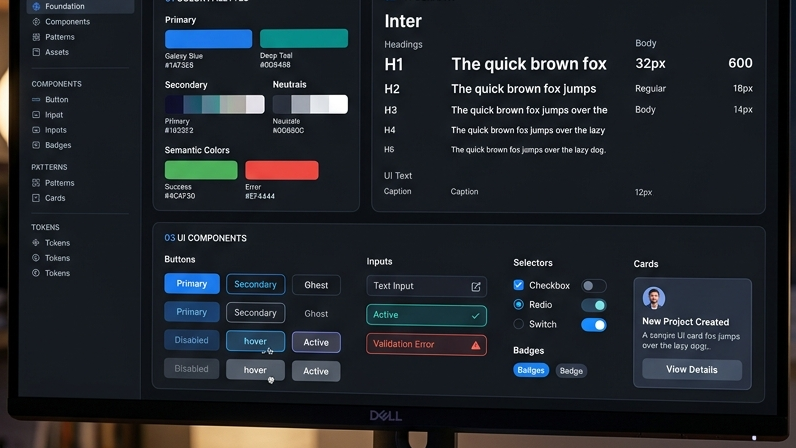
The biggest risk with micro-frontends is visual fragmentation. If each team builds its own buttons, its own form inputs, its own color palette, the user experience degrades into an inconsistent patchwork that feels like five different products stitched together.
The solution is a shared design system - a component library that every micro-frontend consumes. This is not optional. It is the single most important investment in a micro-frontend architecture.
The design system should be owned by a dedicated team (or a rotating guild) and published as a versioned package. Micro-frontends pin to a specific version and upgrade on their own schedule. This gives consistency without coupling - teams get the same buttons and typography while maintaining independent deployments.
In practice, we publish design systems as both npm packages and Storybook documentation. Every component is tested visually using Chromatic, ensuring that changes to the design system do not inadvertently break micro-frontends that depend on it.
Performance and Practical Considerations
Performance in micro-frontend architectures requires deliberate attention. Without it, you end up shipping more JavaScript, making more network requests, and creating a slower experience than the monolith you replaced.
Key considerations:
- Shared dependency deduplication: Use Module Federation's shared scope to ensure libraries like React and your design system are loaded exactly once, not per micro-frontend.
- Lazy loading: Only load a micro-frontend when the user navigates to its route. The checkout module does not need to be in the initial bundle if the user is browsing the product catalog.
- Prefetching: Anticipate user navigation and prefetch the next likely micro-frontend during idle time. This hides the network latency of loading a separate bundle.
- Shared state management: Cross-micro-frontend state should be minimal. Use events or a lightweight pub/sub mechanism rather than a shared Redux store. Each micro-frontend should own its own state and communicate through well-defined contracts.
The GTEMAS Frontend Practice
At GTEMAS, we have delivered micro-frontend architectures for enterprise clients in fintech, e-commerce, and logistics. Our standard approach uses Module Federation with a shared design system published via Storybook. We set up independent CI/CD pipelines per micro-frontend using GitHub Actions, with automated visual regression testing via Chromatic.
We do not recommend micro-frontends for every project. For many clients, a well-structured monorepo with Turborepo or Nx provides sufficient team independence without the operational overhead of multiple deployments. The right architecture depends on team size, release frequency, and the specific pain points you are solving.

If your frontend team is growing and deployment coordination is becoming the bottleneck, the conversation about micro-frontends is worth having. We can help you evaluate whether decomposition makes sense for your specific situation and, if it does, design an architecture that delivers independence without sacrificing user experience.